
The Hospital Administrator's Guide to Managing Radiology Downtime During an OEM Upgrade
But before those benefits can be realized, organizations must navigate a challenge that often receives less attention than it deserves – downtime.
While OEM upgrades from manufacturers such as GE HealthCare and Siemens Healthineers are designed to move imaging programs forward, the installation process can temporarily disrupt operations. Depending on the scope of the project, downtime may last days or even weeks, creating ripple effects across patient care, scheduling, staffing, and revenue.

The Hidden Cost of Downtime
When an imaging system goes offline, the impact extends far beyond the radiology department.
Patients may experience longer wait times or have appointments rescheduled. Referring physicians may need to send patients elsewhere to receive timely imaging services. Internal teams are tasked with balancing operational demands while maintaining a positive patient experience.
Failing to plan for an interim solution during an OEM upgrade can lead to:
- Disrupted Patient Care: Longer wait times, rescheduled appointments, and the risk of patients seeking care elsewhere.
- Lost Referral Revenue: Referring physicians sending patients to competitors to ensure timely mobile medical imaging or specialized scans.
- Operational Strain: Internal teams managing the stress of scheduling backlogs that can take months to recover from.
- Service Gaps across Modalities: Immediate capacity loss for critical diagnostic services, whether the upgrade is for an MRI, CT, PET/CT, or specialized cardiac PET/CT system.
That is why successful organizations approach equipment upgrades not only as a technology project, but as a continuity-of-care initiative.
Why Should Healthcare Leaders Plan for Radiology Downtime Before an Upgrade?
Failing to plan for an interim imaging solution doesn’t just disrupt schedules, it risks patient care and experience and immediate revenue loss.
One of the biggest mistakes healthcare organizations make is waiting until installation dates are finalized before discussing operational impacts.
The most successful upgrade projects begin months in advance with a simple question:
“What will happen to our patients while this system is unavailable?”
Understanding current imaging volumes, peak scheduling periods, and referral patterns helps leaders identify where pressure points are likely to emerge. Some organizations discover they can absorb a portion of the disruption through scheduling adjustments. Others realize additional imaging capacity will be necessary to maintain service levels.
Regardless of the approach, early planning creates options. Last-minute planning typically creates stress.

Keeping Departments Aligned
Radiology is often at the center of an upgrade project, but it is rarely the only department affected.
Scheduling teams need visibility into timelines. IT departments must coordinate system integration and testing. Facilities teams are often managing construction requirements. Clinical leaders need confidence that patient care will continue uninterrupted.
When these groups are brought together early, organizations are better positioned to avoid surprises and maintain operational stability throughout the project.
Just as important is communication with patients and referring physicians. Proactive outreach helps manage expectations, preserve trust, and reduce the likelihood that patients seek care elsewhere during the transition.
Maintaining Access with Mobile MRI, CT, and PET/CT Trailers During an Upgrade
For many healthcare organizations, maintaining imaging access becomes the top priority during a system replacement or upgrade.
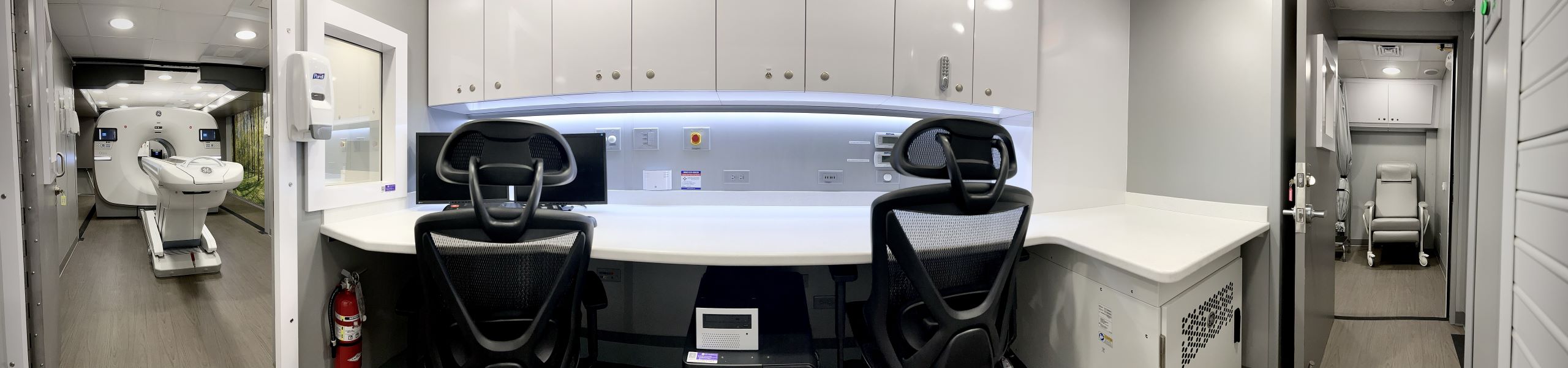
Rather than asking patients to wait or directing them to competitors, many providers choose to supplement capacity with temporary imaging solutions. Mobile MRI, CT, PET/CT, and Cardiac PET/CT units can help organizations continue serving patients while permanent equipment is offline.
This approach not only helps preserve revenue and referral relationships but also reinforces a commitment to patient-centered care. Patients can continue receiving services close to home, while providers maintain continuity throughout the upgrade process.
Thinking Beyond Installation Day
A successful upgrade doesn’t end when the equipment is powered on.
Organizations should have a clear plan for ramping operations back up, addressing scheduling backlogs, and communicating availability to referral partners. To ensure a smooth transition, many administrators structure their imaging equipment for lease or interim rental agreements to include a few days of overlap.
Whether you are transitioning to a new fixed MRI, CT, PET/CT, or cardiac PET/CT system, having this buffer allows clinical staff to complete applications training on the new OEM equipment without shutting down patient volume entirely.
The faster an imaging department can return to full capacity, the faster it can begin realizing the benefits of its investment.
Turning Downtime Into an Opportunity
OEM upgrades are an important investment in the future of an imaging program, but they shouldn’t come at the expense of patient access or operational performance.
With thoughtful planning, proactive communication, and the right continuity strategy, healthcare organizations can successfully navigate downtime while protecting patient care, preserving referral relationships, and maintaining operational momentum.
At Shared Imaging, we partner with healthcare organizations to keep imaging services running during equipment upgrades through flexible mobile and interim MRI, CT, PET/CT, and Cardiac PET/CT solutions. Whether you’re planning a system replacement, facility renovation, or service line expansion, our team works alongside yours to develop a solution that aligns with your timeline, patient volume, and operational goals.
Planning an OEM upgrade?
Let’s talk about how Shared Imaging can help you maintain continuity of care, minimize disruption, and keep your imaging program moving forward.